
Building & Frames DYNAMIC 4 – subscription
QUARTERLY SUBSCRIPTION
Complete package for the analysis of building structures, windows and courtain walling.
Software included in this bundle:
MOLD DYNAMIC 3 (2D or 3D) + FRAME SIMULATOR 3 + FRAME COMPOSER 3
[box type=”info”]An active internet connection is required to work with our software subscriptions. Please see our Terms of Subscription.[/box]
For the Thermal analysis of building components and windows
With this package you can perform DYNAMIC thermal analysis of any construction element, windows frames and building structures, in compliance with the relevant norms.
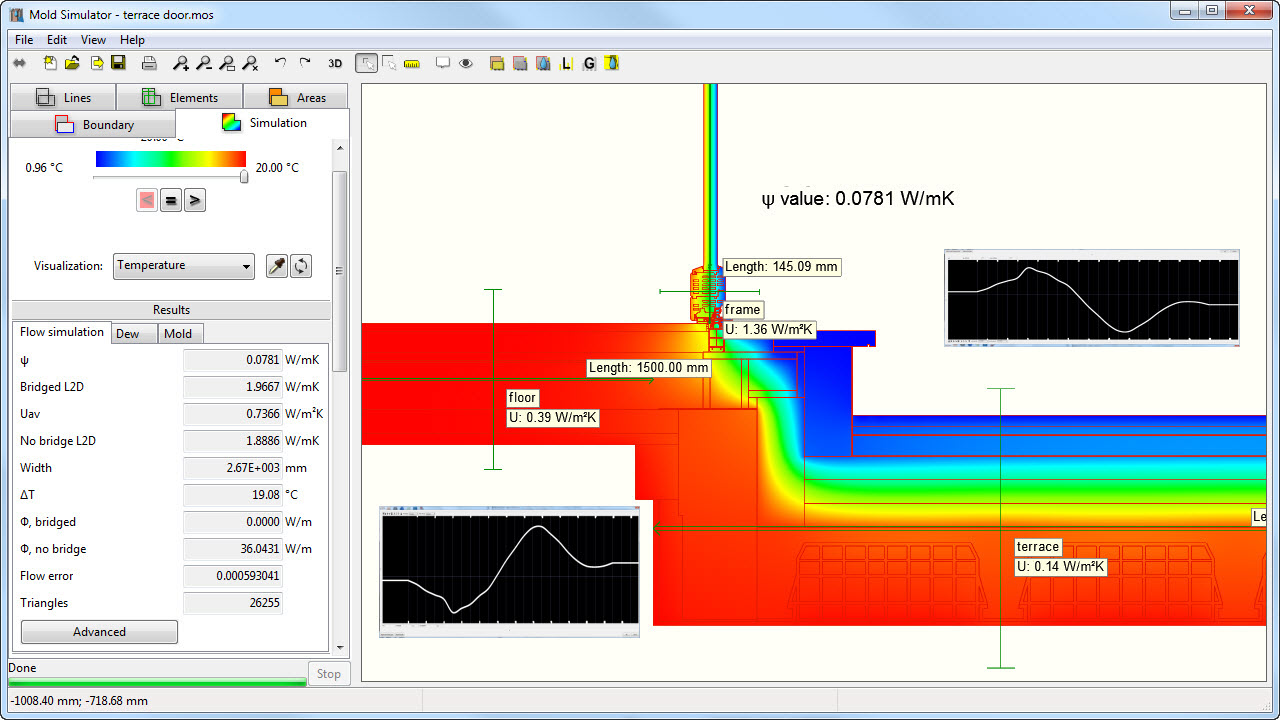
Thermal analysis of the window/wall installation joint
The installation joint of a frame is a border zone between two standards: EN ISO 10077-2 for window and EN 10211 for walls. The two norms provide different methods for the calculation of cavities and assignment of the surface resistances. Additionally, for a precise calculation of the linear transmittance Ψ of the thermal bridge between the frame and the building structure, it is necessary to know the actual Uf transmittance of the frame and Ug of glass.
With Building&Frames package you will be able to perform calculation of frames within Mold Dynamic. When calculating a window/wall joint it will be therefore possible:
- to calculate cavities in wall according to ISO 6946 and cavities in frame according to ISO 1077-2
- to automatically apply an increased surface resistance on the internal frame border, as required by ISO 10077-2
- to use the library and the calculation functions of the glazing to obtain accurate Ug values and surface temperatures on the glass/frame border
Description
Quarterly subscription
Activation with software key for single computer or on a USB stick sold separately.
The program resides and runs entirely on your computer. An internet connection is required to operate it, as the program checks every now online that activation is valid. Internet bandwidth is not an issue, because the data exchanged with our servers are only few bytes required for the verification of the presence of the activation key.
Amounts
Subscription fee: depending on the software, to be charged every three months from subscription activation.
Amount for initial activation or reactivation of an expired subscription: € 21
Payment
Credit card / Paypal (automatic payment)
By Bank transfer (manual payment)
Terms
Advanced payment for each quarter.
The subscription is automatically renewed at the end of each quarter for the following quarter, unless canceled by the user before the deadline.
The subscription is deemed to expire automatically in the event of late payment renewal of more than 10 days.
Redemption
The user can decide at any time to purchase the program. In this case the license fee paid will be deducted.
The cost will be the difference between the list price plus 5% and the total amount paid for the subscription rates.
The costs of activation/reactivation and amounts paid for assistance or other service fees will not be deducted.
Example of redemption after 9 months of Mold PRO subscription:
3 quarterly subscriptions paid: 3 X €99 = €297
increase 5% = €39.5
cost of redemption of Mold PRO 3 license after 9 months subscritpion: €790 + €39.5 – €297 = €532
Excluded Amounts
Following amounts will not be considered in case of redemption:
– Amounts paid for previous expired subscriptions (non-consecutive quarters).
– Activation/reactivation fees
– Amounts paid for plugins, support, or other reasons.
From cart to use
How to order
Choose the program options at the top of the page and click “Add to cart”. If you want activation on a new USB dongle, go back to the catalog and add a USB dongle to your order.
Proceed to checkout and fill in all the billing fields. If you are not registered yet, choose a username and password: with your account you will be able to manage orders and subscriptions.
How to pay
You can pay by credit card, PayPal or advance bank transfer.
- Credit card or PayPal: payment is handled entirely by the payment provider and Dartwin never sees or stores your card details. If the payment succeeds you immediately receive the order confirmation. If you do not receive it, the payment did not go through: try again, possibly with another card, or contact us.
- Bank transfer: after placing the order you receive an email with the bank details. The program is activated and the USB dongle shipped once the payment is recorded; to speed things up you can send us the transfer receipt.
How to get the program
The program is delivered by download, there is no physical media. After payment you receive the activation email with the link to your User Panel, where you can download the installation files.
How to activate the program
There are three activation methods (see also the Activation tab):
- Software key: after installing and starting the program you will see an 8-character code; email it to us and we will send you the activation key as soon as the payment is recorded.
- USB dongle: you receive it by express courier, shipped as soon as the payment is recorded; to activate it you need the PIN code we provide.
- Web License: you start the program from any computer by entering your username and password.
How to use the program
Instructions, tutorials and documentation are in the program’s Help menu.
If you purchased online support, write to us proposing a few dates and times: we will confirm the session and send you the link to join it on Microsoft Teams.
Operating system
The programs and plugins are available for Windows and Mac.
Language
The program and its documentation are available in English, Italian, French, German and Spanish; the language is selected within the program.