
The new 8 versions are now available
Update your program to always get the best from Mold Simulator and Frame Simulator.
With an Updates & Upgrades subscription, keeping your program constantly updated will cost you less than just updating it when you need it. Even if you don’t use it frequently.
If you don’t have an Updates and Upgrades subscription you can’t get the latest updated version
Want to know what’s new?
Go to the Help/Documentation menu in Mold or Frame. Under 2 – Changes you’ll see all the features available for your license.
Don’t have an Updates & Upgrades subscription yet, or has your subscription expired?
Go to the Software Updates page and sign up for a subscription to immediately have access to the new, updated version.
How to download your updated installation files
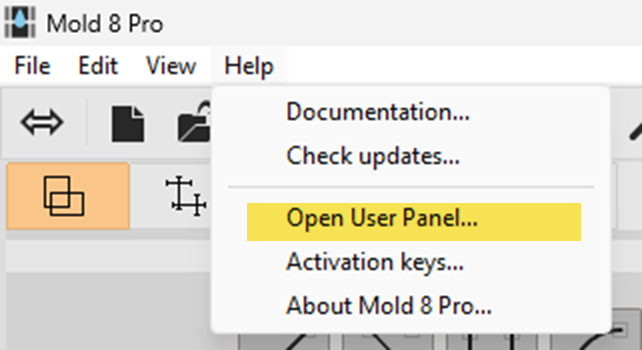
Open Mold Simulator or Frame Simulator and go to the Help/Open User Panel menu.
There you’ll find the latest installation files for your license.
You can also find the link to your User Panel in the activation email you received from Dartwin.
If you cannot find your installation files, please contact Dartwin.
