
Mold PRO
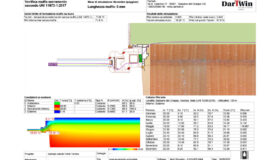
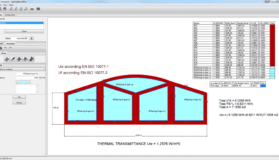
Software agli elementi finiti 2D o 3D per il calcolo dei ponti termici in regime stazionario (convalidato ISO 10211) e per la verifica del rischio di condensa/muffa secondo la norma UNI EN ISO 13788
Mold PRO include il generatore parametrico di ponti termici BRIDGE GENERATOR che consente la creazione di ponti termici e il collegamento con il software EC700 Edilclima.
Fascia di prezzo: da €790,00 a €2.480,00 +iva
MOLD PRO – calcolo dei ponti termici e della condensa
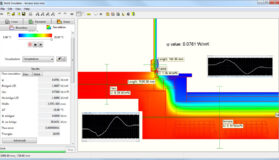
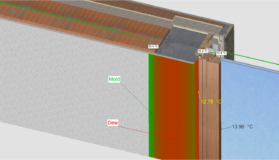
è un modellatore di elementi finiti (fem) per il calcolo tridimensionale o bidimensionale dei ponti termici in condizioni stazionarie e la verifica del rischio di formazione di muffe e condensa superficiale e interstiziale di pareti, pavimenti, tetti e altre strutture edilizie.
La versione PRO/2D consente il calcolo del valore ψ (PSI) della trasmittanza del ponte termico lineare.
La versione 3D, oltre a tutte le funzionalità della versione 2D, consente anche il calcolo del valore di trasmittanza puntuale Χ (CHI).
Oltre al calcolo dei flussi termici, il programma esegue automaticamente altre due simulazioni 2D o 3D con i parametri della norma ISO 13788: una per la verifica del rischio di condensa superficiale e una per la valutazione della formazione di muffe e condensa interstiziale.
Mold PRO incorpora un generatore parametrico 2D per la creazione di modelli per i ponti termici più comuni.
Consente inoltre la personalizzazione delle visualizzazioni dei risultati e delle stampe dei report.
VALIDAZIONE
Il programma è validato secondo la norma UNI EN ISO 10211:2018 (Ponti termici negli edifici – Flussi termici e temperature superficiali – Calcoli dettagliati).
Perpetual License Updates
With the purchase of a new perpetual license comes 12 months of free updates.
Upon expiration you will be able to subscribe to an Updates subscription for another 12 months, through which you will have access to any updates released during the period for your license. The fee for the
HOW TO ACTIVATE THE DARTWIN SOFTWARE
When purchasing the software, you can choose between three different activation methods: with Software Key or with USB Key or with Web License.
To use the program simultaneously on multiple computers you need multiple licenses or multiple subscriptions.
Activation with SOFTWARE KEY
Standard activation method, included in the program price.
The program is activated by an alphanumeric activation key, valid for the computer on which it was initially installed.
The activation key is generated and sent within a few hours of payment, based on a code (Computer code) shown during installation, which the user must send us.
Once the license has been activated on a computer, it is always possible to transport it to another machine: by means of a procedure via the internet, it is possible to deactivate the license on the current computer and activate it on another computer.
For a possible reinstallation of the software on the same hardware, the initial procedure is repeated, by entering the same software activation key.
If, on the other hand, the hard disk has been reformatted or all or part of the hardware has been changed, we will provide a spare installation key upon request (this can only be done once).
Activation with USB HARDWARE KEY
Optional activation method – to be purchased separately.
If you choose this mode, the user will receive by registered mail or courier a USB key with all the licenses purchased (one of each type).
Activation instructions will be provided with a separate email, in order to use the programs on any computer (not simultaneously) simply by moving the key from one computer to another.
Activation with WEB LICENSE
Flexible access for smart working with an annual subscription.
Web License allows you to access your licenses anywhere and at any time by entering only your username and password.
This simplified access mode is particularly suitable for work teams that need to share the use of programs remotely.
Any member of the group can start the software by simply entering the username and password provided.
It is also possible to use the software simultaneously based on the number of simultaneities purchased. To use Web License you must already have a license in version 5 or higher.
From cart to use
How to order
Choose the program options at the top of the page and click “Add to cart”. If you want activation on a new USB dongle, go back to the catalog and add a USB dongle to your order.
Proceed to checkout and fill in all the billing fields. If you are not registered yet, choose a username and password: with your account you will be able to manage orders and subscriptions.
How to pay
You can pay by credit card, PayPal or advance bank transfer.
- Credit card or PayPal: payment is handled entirely by the payment provider and Dartwin never sees or stores your card details. If the payment succeeds you immediately receive the order confirmation. If you do not receive it, the payment did not go through: try again, possibly with another card, or contact us.
- Bank transfer: after placing the order you receive an email with the bank details. The program is activated and the USB dongle shipped once the payment is recorded; to speed things up you can send us the transfer receipt.
How to get the program
The program is delivered by download, there is no physical media. After payment you receive the activation email with the link to your User Panel, where you can download the installation files.
How to activate the program
There are three activation methods (see also the Activation tab):
- Software key: after installing and starting the program you will see an 8-character code; email it to us and we will send you the activation key as soon as the payment is recorded.
- USB dongle: you receive it by express courier, shipped as soon as the payment is recorded; to activate it you need the PIN code we provide.
- Web License: you start the program from any computer by entering your username and password.
How to use the program
Instructions, tutorials and documentation are in the program’s Help menu.
If you purchased online support, write to us proposing a few dates and times: we will confirm the session and send you the link to join it on Microsoft Teams.
Operating system
The programs and plugins are available for Windows and Mac.
Language
The program and its documentation are available in English, Italian, French, German and Spanish; the language is selected within the program.
Prodotti correlati
-

-
In offerta!
Passa al pacchetto Strutture&Serramenti
-
In offerta!