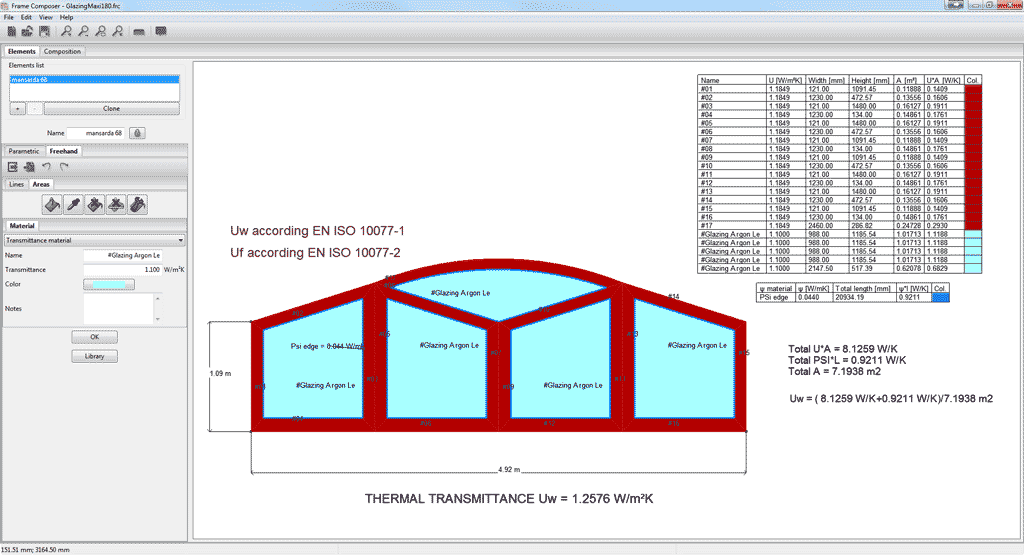
Frame Composer
Software for the calculation of global thermal transmittance of windows (Uw), curtain wallings (Ucw) and other composite building structures. This module is already included in the purchase of Frame Simulator, but it can also be ordered separately here.
Price range: €250,00 through €650,00 +vat
Calculate U thermal transmittance
Frame Composer quickly calculates the values of global thermal transmittance of window frames (Uw) and curtain wallings (Ucw) from the calculation results of Frame Simulator or from your CAD design.
Frame Composer module is already included in the purchase of Frame Simulator, but it can also be ordered separately here.
Frame Composer can calculate the thermal transmittance of structures of any shape, thanks to the possibility to import DXF files and to the editing tools in freehand.
FRAME COMPOSER can be used to calculate:
- Uw and Ud transmittance of windows, doors, lift&slides as well as any complex fenestration system according to the EN ISO 10077-1
- Ucw transmittance of curtain walling modules according to EN ISO 12631
- U transmittance of precast concrete panels and other composite structures made of frame+panels, including connection elements, according to EN ISO 6946
- Uw and Ud corrected values for the presence of internal/external curtains
From cart to use
How to order
Choose the program options at the top of the page and click “Add to cart”. If you want activation on a new USB dongle, go back to the catalog and add a USB dongle to your order.
Proceed to checkout and fill in all the billing fields. If you are not registered yet, choose a username and password: with your account you will be able to manage orders and subscriptions.
How to pay
You can pay by credit card, PayPal or advance bank transfer.
- Credit card or PayPal: payment is handled entirely by the payment provider and Dartwin never sees or stores your card details. If the payment succeeds you immediately receive the order confirmation. If you do not receive it, the payment did not go through: try again, possibly with another card, or contact us.
- Bank transfer: after placing the order you receive an email with the bank details. The program is activated and the USB dongle shipped once the payment is recorded; to speed things up you can send us the transfer receipt.
How to get the program
The program is delivered by download, there is no physical media. After payment you receive the activation email with the link to your User Panel, where you can download the installation files.
How to activate the program
There are three activation methods (see also the Activation tab):
- Software key: after installing and starting the program you will see an 8-character code; email it to us and we will send you the activation key as soon as the payment is recorded.
- USB dongle: you receive it by express courier, shipped as soon as the payment is recorded; to activate it you need the PIN code we provide.
- Web License: you start the program from any computer by entering your username and password.
How to use the program
Instructions, tutorials and documentation are in the program’s Help menu.
If you purchased online support, write to us proposing a few dates and times: we will confirm the session and send you the link to join it on Microsoft Teams.
Operating system
The programs and plugins are available for Windows and Mac.
Language
The program and its documentation are available in English, Italian, French, German and Spanish; the language is selected within the program.