
Mold PRO4
Finite elements modeling (fem) software for thermal bridges calculation and condensation/mold assesment. ISO 10211 validated.
Select options to see prices.
MOLD SIMULATOR PRO – v.4
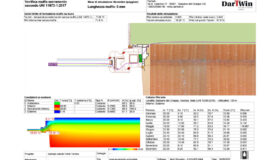
is a 2D or 3D finite elements modeler (FEM) for the calculation of thermal bridges and condensation/mold analysis of walls, floors, roofs and other building structures.
It is a professional tool that you can learn in a couple of hours and use in your daily design and certification activity.
With Mold Simulator Pro you can:
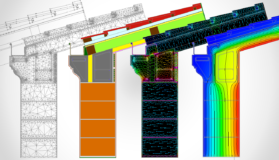
- perform fem analysis of any section loaded from a cad drawing (dxf)
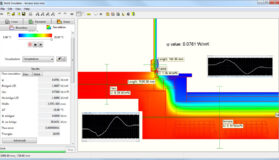
- calculate the inside and outside ψ (2D) and χ (3D) value of the linear and point transmittance for any thermal bridge
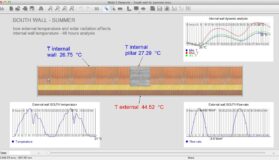
- perform surface and interstitial condensation analysis according to ISO 13788 norm
- assess risk of mold on internal surfaces according to ISO 13788 norm
- calculate temperature and heat flow values at any point on the border and inside the section, for any boundary condition
- display and print many different computation results with very attractive graphics: isotherms, heat flow, meshing triangulation, boundary conditions and many others
- calculate the U thermal transmittance of inhomogeneous structures
VERSION
LOCAL to be installed on single computers or SERVER for lan networks
VALIDATION
Mold Simulator has been developed according to the following norms:
- EN ISO 6946 “Building components and building elements – Thermal resistance and thermal transmittance – Calculation method” For building structures the norm is EN ISO 10211.
- EN ISO 10211 “Thermal bridges in building construction – Heat flows and surface temperatures – Detailed calculation”.
- EN ISO 13788 “Hygrothermal performance of building components and building elements”.
From cart to use
How to order
Choose the program options at the top of the page and click “Add to cart”. If you want activation on a new USB dongle, go back to the catalog and add a USB dongle to your order.
Proceed to checkout and fill in all the billing fields. If you are not registered yet, choose a username and password: with your account you will be able to manage orders and subscriptions.
How to pay
You can pay by credit card, PayPal or advance bank transfer.
- Credit card or PayPal: payment is handled entirely by the payment provider and Dartwin never sees or stores your card details. If the payment succeeds you immediately receive the order confirmation. If you do not receive it, the payment did not go through: try again, possibly with another card, or contact us.
- Bank transfer: after placing the order you receive an email with the bank details. The program is activated and the USB dongle shipped once the payment is recorded; to speed things up you can send us the transfer receipt.
How to get the program
The program is delivered by download, there is no physical media. After payment you receive the activation email with the link to your User Panel, where you can download the installation files.
How to activate the program
There are three activation methods (see also the Activation tab):
- Software key: after installing and starting the program you will see an 8-character code; email it to us and we will send you the activation key as soon as the payment is recorded.
- USB dongle: you receive it by express courier, shipped as soon as the payment is recorded; to activate it you need the PIN code we provide.
- Web License: you start the program from any computer by entering your username and password.
How to use the program
Instructions, tutorials and documentation are in the program’s Help menu.
If you purchased online support, write to us proposing a few dates and times: we will confirm the session and send you the link to join it on Microsoft Teams.
Operating system
The programs and plugins are available for Windows and Mac.
Language
The program and its documentation are available in English, Italian, French, German and Spanish; the language is selected within the program.